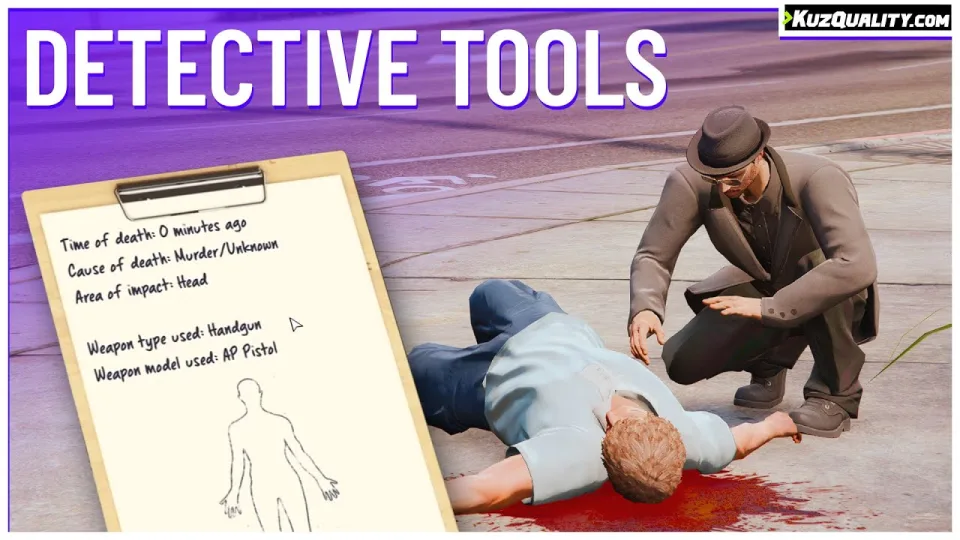
Turning a shooting into something investigable
Without an examination tool, a death on a roleplay server resolves in chat: somebody says what happened and everyone agrees or argues. This script puts the information in the world instead. Players can investigate a body and learn when and how the person died, and whether it was an accident or a killing.
The detail that does the most work is the wound location: the body area that took the critical blow is shown. That single fact is what lets EMS treat realistically and lets a detective build a case rather than assert one.
What it covers
- Investigate dead players.
- Investigate dead NPCs.
- A clean, optimised interface for the results.
Access control
On ESX and QBCore, the tools can be restricted to specific jobs, so examination is a police or coroner action rather than something any bystander performs. On a standalone install it works for everyone, which suits a server without whitelisted emergency services.
Integration
Compatible with qtarget, qb-target and ox_target, though none of them are required. Extensively configurable.
Performance
0.00 to 0.01ms.
Compatibility
Standalone, ESX, QBCore, Qbox and VRP. All framework and dependency code is editable, so pointing it at a custom job system is straightforward.
Delivered by email within minutes of checkout.
Detective Tools installation for FiveM servers
Detective Tools is a FiveM script from CFX Assets Tebex Store in the ESX Scripts category. After checkout, download the resource package from your CFX Assets Tebex Store order email, upload the included folder to your server, and start it from server.cfg.
resources/ directory.
ensure line using the exact folder name shipped in the download.
Use this as the server.cfg pattern. Replace the folder name if your downloaded resource folder is different:
ensure detective-toolsThe previous generated tebex-... prefix has been removed here because the real folder name is controlled by the download package, not by this product page.
Why Detective Tools fits a FiveM server
Framework labels for this listing: esx, qbcore, qbox. Check the included readme for any product-specific setup notes.
Detective Tools compatibility and purchase details
Write a review
Reviews are moderated before appearing. Purchased the product? Your review gets a VERIFIED badge automatically.
Related scripts







About this FiveM script
Detective Tools is a premium FiveM script for esx, qbcore, qbox servers. It’s part of the Tebex catalog, a curated selection of resources for QBCore, ESX and Qbox roleplay servers. Every script on Tebex ships with lifetime updates, instant email delivery, and email support for technical questions.
It installs as a standard FiveM resource: unzip it into your resources folder, add it to your server.cfg, and restart. The config-first design means you can change prices, permissions and locations without editing the core Lua.
Framework fit for this listing: esx, qbcore, qbox. Check the included readme for any setup notes specific to this resource. Licence and refund terms are set out in our terms.