Making the inventory visible
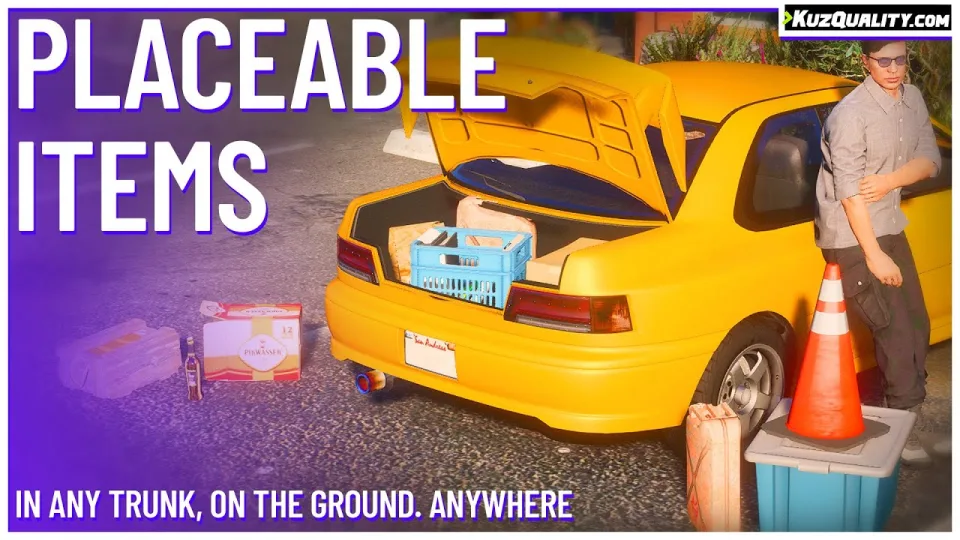
Almost everything valuable on a roleplay server is invisible. Drugs, weapons, cash and stolen goods all live inside a menu that only their owner can see, which quietly removes the tension from transporting them. This script moves items into the world: any inventory item can be placed as a physical object that everyone can see.
The consequence is immediate. A crew moving product in the back of a pickup is now moving something a passing officer could notice. That is a different game to carrying the same items in a hidden list.
Placement
Define a model per item, or let the fallback models handle anything you have not configured, so every item in your inventory is placeable from day one. Placement runs through the script's own menu (F4 by default), or you can add a "Place" option directly into your inventory UI if you prefer. The placement method itself is smooth rather than a snap-to-ground drop.
Persistence
Items placed on the ground are saved and respawn after a server restart. A stash left in an alley is still there tomorrow.
Vehicles
Items can be stored in any vehicle's trunk, and on the vehicle itself, staying attached as it moves. A custom algorithm predicts trunk dimensions so placement works across the vehicle list without being exploitable.
Abuse resistance
The entire placement logic is server-side. That is the detail worth checking on any script that creates world objects, because client-authoritative placement is how duplication exploits happen.
Compatibility
ESX, QBCore, Qbox and ox_inventory, with plug-and-play support for Quasar's qs-inventory. Optional integration with qb-target, qtarget and ox_target.
Delivered by email within minutes of checkout.
KuzQuality Placeable/Throwable Items installation for FiveM servers
KuzQuality Placeable/Throwable Items is a FiveM script from CFX Assets Tebex Store in the ESX Scripts category. After checkout, download the resource package from your CFX Assets Tebex Store order email, upload the included folder to your server, and start it from server.cfg.
resources/ directory.
ensure line using the exact folder name shipped in the download.
Use this as the server.cfg pattern. Replace the folder name if your downloaded resource folder is different:
ensure kuzquality-placeable-throwable-itemsThe previous generated tebex-... prefix has been removed here because the real folder name is controlled by the download package, not by this product page.
Why KuzQuality Placeable/Throwable Items fits a FiveM server
Framework labels for this listing: esx, qbcore, qbox. Check the included readme for any product-specific setup notes.
KuzQuality Placeable/Throwable Items compatibility and purchase details
Write a review
Reviews are moderated before appearing. Purchased the product? Your review gets a VERIFIED badge automatically.
Related scripts









About this FiveM script
KuzQuality Placeable/Throwable Items is a premium FiveM script for esx, qbcore, qbox servers. It’s part of the Tebex catalog, a curated selection of resources for QBCore, ESX and Qbox roleplay servers. Every script on Tebex ships with lifetime updates, instant email delivery, and email support for technical questions.
It installs as a standard FiveM resource: unzip it into your resources folder, add it to your server.cfg, and restart. The config-first design means you can change prices, permissions and locations without editing the core Lua.
Framework fit for this listing: esx, qbcore, qbox. Check the included readme for any setup notes specific to this resource. Licence and refund terms are set out in our terms.