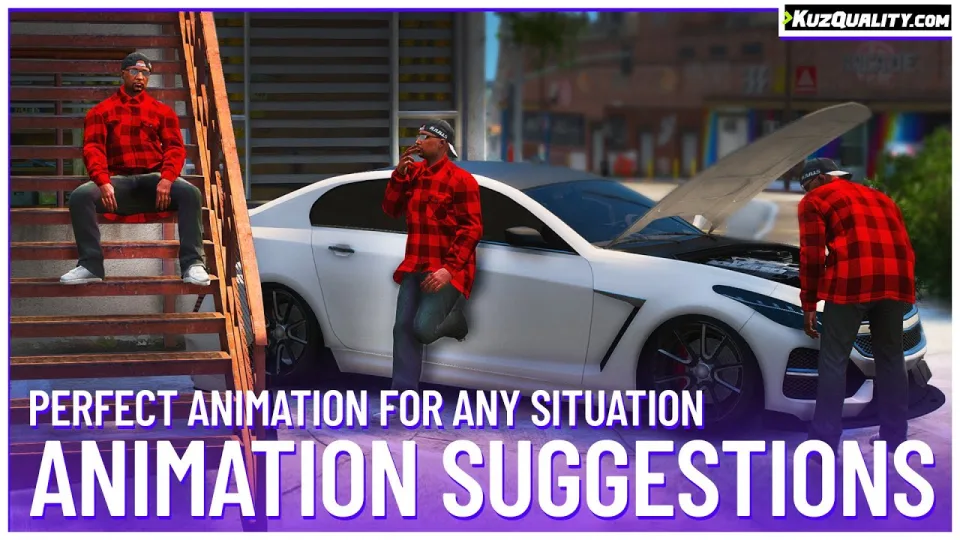
One keybind, and the game works out what you meant
Emote menus fail for a simple reason: by the time a player has opened a list and found "lean on wall", the moment has passed. This script inverts the interaction. It watches what is around the player and suggests the animation that fits, so the whole thing collapses into a single keypress. Walk away and it stops.
Several animations also align the player to the object they are interacting with, so leaning on a bar actually means leaning on that bar rather than standing near it in a lean pose.
What it detects
- Idle. After four or more seconds stationary, anywhere.
- Lean. Something directly behind the player, such as a wall or vehicle.
- Leaning on a bar. Something directly in front, no higher than chest height.
- Sitting. Something behind and below waist height: walls, stairs, chairs.
- Intimidation. For a few seconds after melee combat.
- Showing pain. Below 60% health.
- Car inspection. Looking at an open engine bay or trunk.
- Car cheering. Looking at a car doing a burnout or drifting.
- Greeting. Looking at another player you have not greeted in the last 15 minutes.
That last condition is the sort of detail that separates a context system from a gimmick.
Defining your own
- Location-specific. Define an area by coordinates and radius where particular animations are suggested, for clubs, bars and restaurants. Add as many as you like.
- Prop-specific. Assign animations to props, so a chair means sitting and a bin means rummaging. Again, unlimited.
Integration
Animations are synchronised between all players, can spawn props and tools, and can fire events on start so your own resources can react.
Performance
0.00 to 0.01ms idle, and 0.01 to 0.03ms while stationary with an animation available.
Compatibility
Standalone, and working on ESX, QBCore and Qbox.
Delivered by email within minutes of checkout.
Animation Suggestions installation for FiveM servers
Animation Suggestions is a FiveM script from CFX Assets Tebex Store in the ESX Scripts category. After checkout, download the resource package from your CFX Assets Tebex Store order email, upload the included folder to your server, and start it from server.cfg.
resources/ directory.
ensure line using the exact folder name shipped in the download.
Use this as the server.cfg pattern. Replace the folder name if your downloaded resource folder is different:
ensure animation-suggestionsThe previous generated tebex-... prefix has been removed here because the real folder name is controlled by the download package, not by this product page.
Why Animation Suggestions fits a FiveM server
Framework labels for this listing: esx, qbcore, qbox. Check the included readme for any product-specific setup notes.
Animation Suggestions compatibility and purchase details
Write a review
Reviews are moderated before appearing. Purchased the product? Your review gets a VERIFIED badge automatically.
Related scripts


About this FiveM script
Animation Suggestions is a premium FiveM script for esx, qbcore, qbox servers. It’s part of the Tebex catalog, a curated selection of resources for QBCore, ESX and Qbox roleplay servers. Every script on Tebex ships with lifetime updates, instant email delivery, and email support for technical questions.
It installs as a standard FiveM resource: unzip it into your resources folder, add it to your server.cfg, and restart. The config-first design means you can change prices, permissions and locations without editing the core Lua.
Framework fit for this listing: esx, qbcore, qbox. Check the included readme for any setup notes specific to this resource. Licence and refund terms are set out in our terms.