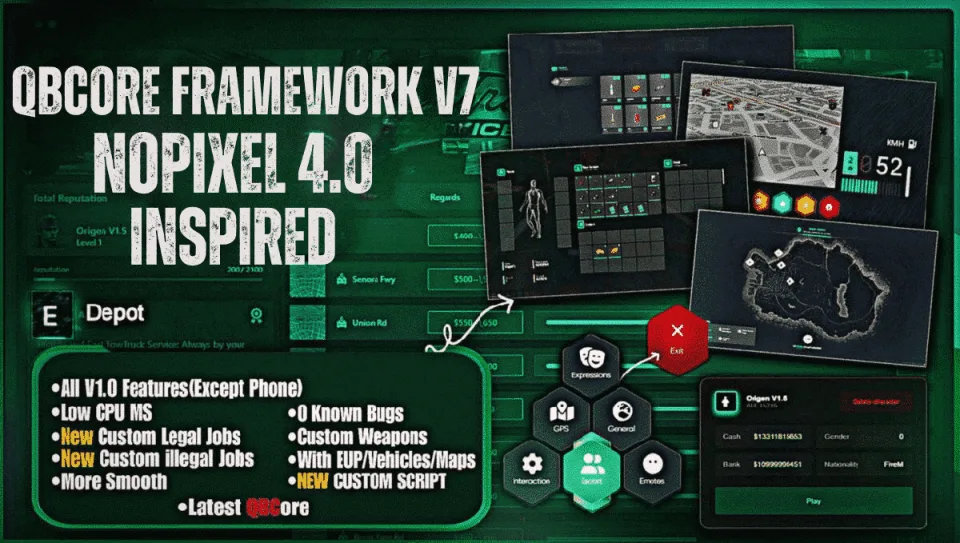
The 4.0 vocabulary on a current QBCore base
NoPixel 4.0 reset what a serious roleplay server is expected to look like, and most owners want that interface language without rebuilding their server around a fork nobody maintains. V7 takes the other approach: NoPixel-4.0-inspired UI and systems assembled on a current QBCore base, so third-party QBCore resources still install normally afterwards.
What is included
- NoPixel-4.0-inspired interface throughout, with 4.0-style scripts installed.
- Custom jobs and custom scripts.
- Custom robberies and jobs beyond the framework defaults.
- A complete roleplay server intended to install and launch rather than be assembled.
Extending it
Because the base is standard QBCore, the build stays compatible with both ordinary QBCore resources and NoPixel-4.0-style scripts, so you can keep adding to it in either direction.
About the preview
The showcase covers roughly 35% of what ships. Treat the video as a floor rather than a full inventory of the build.
What you supply
Hosting, a database and your own Cfx.re server key, plus a config pass over prices, payouts and whitelists before you open to players.
Delivered by email within minutes of checkout, with the resources folder and matching SQL.
QBCore Framework V7 [NoPixel 4.0] installation for FiveM servers
QBCore Framework V7 [NoPixel 4.0] is a FiveM script from CFX Assets Tebex Store in the ESX Scripts category. After checkout, download the resource package from your CFX Assets Tebex Store order email, upload the included folder to your server, and start it from server.cfg.
resources/ directory.
ensure line using the exact folder name shipped in the download.
Use this as the server.cfg pattern. Replace the folder name if your downloaded resource folder is different:
ensure qbcore-framework-v7-nopixel-4-0The previous generated tebex-... prefix has been removed here because the real folder name is controlled by the download package, not by this product page.
Why QBCore Framework V7 [NoPixel 4.0] fits a FiveM server
Framework labels for this listing: esx, qbcore, qbox. Check the included readme for any product-specific setup notes.
QBCore Framework V7 [NoPixel 4.0] compatibility and purchase details
Write a review
Reviews are moderated before appearing. Purchased the product? Your review gets a VERIFIED badge automatically.
Related scripts






About this FiveM script
QBCore Framework V7 [NoPixel 4.0] is a premium FiveM script for esx, qbcore, qbox servers. It’s part of the Tebex catalog, a curated selection of resources for QBCore, ESX and Qbox roleplay servers. Every script on Tebex ships with lifetime updates, instant email delivery, and email support for technical questions.
It installs as a standard FiveM resource: unzip it into your resources folder, add it to your server.cfg, and restart. The config-first design means you can change prices, permissions and locations without editing the core Lua.
Framework fit for this listing: esx, qbcore, qbox. Check the included readme for any setup notes specific to this resource. Licence and refund terms are set out in our terms.