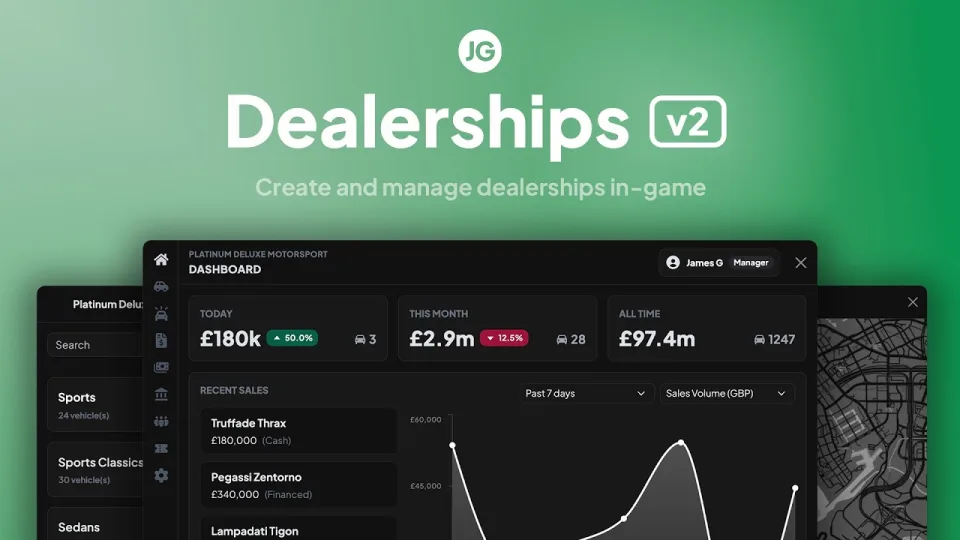
The point at which a car enters your economy
Everything downstream depends on this step. A dealership is where a vehicle gets an owner, a plate and a price, and every garage, mechanic and insurance interaction afterwards is reading what the dealership wrote. Dealerships v2 is a full rebuild of that layer, and it is built to support two very different server designs at once.
Self-service or player-owned
Run public showrooms where anyone buys from a terminal, or hand dealerships to players as businesses with stock, employees, sales and finances of their own. Most servers end up running both: a public lot for starter cars and player-run dealers for everything interesting.
What staff can do
Employee-led sales run through an RP tablet, which is what turns a purchase into a scene rather than a menu. Staff sell vehicles, run financing, pick colours and start test drives. Dealer dashboards give them sales reporting and coupon tracking.
Building it without restarts
An in-game creator handles dealership creation and editing with no restart cycle, and showroom display vehicles can be placed, moved and updated live to match actual stock. Interactions can spawn peds, vehicles and objects, exposed through target, radial menu, text UI or another method you prefer.
Commerce features
- Financing. A configurable vehicle finance system rather than cash-only sales.
- Coupons. Codes for sales, events and discounts.
- Custom payment. A currency API for VIP coins, tokens or an alternate economy.
- Colour options. Full RGB wheel, or restricted RGB and colour ID sets, including chameleon finishes.
Stock delivery
Optionally, ordered vehicles have to physically arrive: a trucking mission delivers them on a trailer. It is the kind of feature that sounds like friction and turns out to create jobs.
Build quality
Rebuilt from scratch on a new UI with a rewritten backend and the performance improvements that came with it. Lifetime updates and Discord support are included.
Compatibility
QBCore, Qbox and ESX. Delivered by email within minutes of checkout.
JG Dealerships v2 installation for FiveM servers
JG Dealerships v2 is a FiveM script from CFX Assets Tebex Store in the ESX Scripts category. After checkout, download the resource package from your CFX Assets Tebex Store order email, upload the included folder to your server, and start it from server.cfg.
resources/ directory.
ensure line using the exact folder name shipped in the download.
Use this as the server.cfg pattern. Replace the folder name if your downloaded resource folder is different:
ensure jg-dealerships-v2The previous generated tebex-... prefix has been removed here because the real folder name is controlled by the download package, not by this product page.
Why JG Dealerships v2 fits a FiveM server
Framework labels for this listing: esx, qbcore, qbox. Check the included readme for any product-specific setup notes.
JG Dealerships v2 compatibility and purchase details
Write a review
Reviews are moderated before appearing. Purchased the product? Your review gets a VERIFIED badge automatically.
Related scripts


About this FiveM script
JG Dealerships v2 is a premium FiveM script for esx, qbcore, qbox servers. It’s part of the Tebex catalog, a curated selection of resources for QBCore, ESX and Qbox roleplay servers. Every script on Tebex ships with lifetime updates, instant email delivery, and email support for technical questions.
It installs as a standard FiveM resource: unzip it into your resources folder, add it to your server.cfg, and restart. The config-first design means you can change prices, permissions and locations without editing the core Lua.
Framework fit for this listing: esx, qbcore, qbox. Check the included readme for any setup notes specific to this resource. Licence and refund terms are set out in our terms.