An admin menu is a permissions problem, not a UI problem
Every FiveM server eventually accumulates a staff team, and every staff team eventually has the same argument: who is allowed to do what. A menu that hands every moderator a teleport, a godmode toggle and a vehicle spawner is not a convenience, it is an incident waiting to be investigated. This resource is built the other way round: it renders whatever the server's existing ACE permission set already allows, and nothing else.
That single decision is what makes it worth installing over a menu with more buttons. Your permissions stay in server.cfg where they are auditable, and the menu becomes a view onto them.
Opening it
Three ways in, all configurable:
- The U key by default.
- The
/admincommand. TriggerEvent("admin:toggleMenu", true)from your own resource, withfalseto close.
The interface
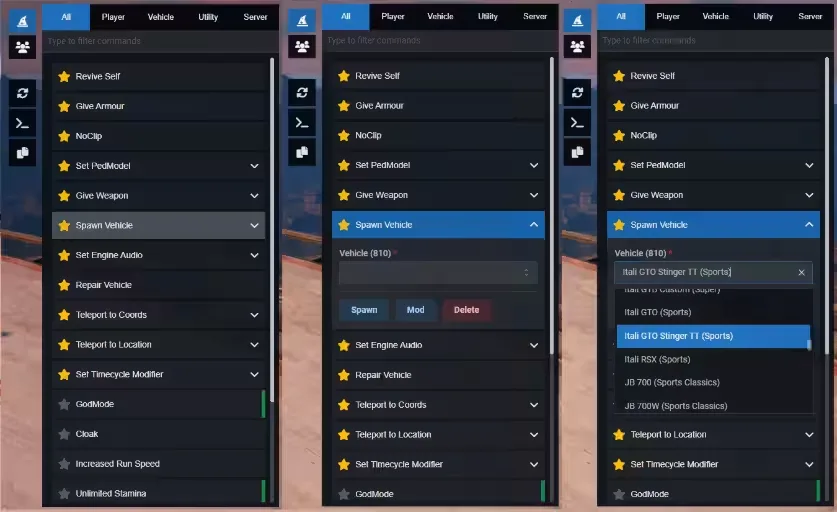
Commands tab. Every action, grouped into All, Player, Vehicle, Utility, User and Server, with live search across labels. Star anything and it moves to favourites, stored locally through Resource KVP so it survives a relog.
Commands come in three shapes. A button runs on a single click. A form expands into a validated panel first, supporting text, number, select, multi-select, checkbox, slider and autocomplete fields, with chained selects so picking a job can load its grades. A toggle highlights green while it is active, which is how noclip and godmode stay visible rather than becoming something you forget you left on. Commands marked close: true dismiss the menu after firing.
Players tab. The connected player list with server ID, display name and, on QBCore, citizen data, each row expanding into quick moderation actions.
Quick actions. An icon sidebar for the things you do constantly: reload favourites, developer mode, copy coordinates.
Configuration
Commands are defined in shared/commands.json rather than hardcoded, so adding your server's own admin commands to the panel is a JSON edit rather than a Lua one. The UI ships pre-built under web/build/; if you want to change the React source, npm install and npm run build inside web/ regenerates it.
Requirements
ox_lib— required. Callbacks, notifications, dialogs, vehicle properties, clipboard.oxmysql— required. Server-side data access.qb-core— optional. Unlocks QBCore player data, jobs, gangs, items and the extra commands that depend on them.
Installing
Drop ag-menu into resources, make sure ox_lib and oxmysql start before it, add ensure ag-menu to server.cfg, then grant the ACE permissions your staff should actually have. That last step is the one that matters; skip it and the menu correctly shows nothing.
Free, full version, delivered by email as a download link the moment you check out.
FREE Admin Menu installation for FiveM servers
FREE Admin Menu is a FiveM script from CFX Assets Tebex Store in the FREE Scripts category. After checkout, download the resource package from your CFX Assets Tebex Store order email, upload the included folder to your server, and start it from server.cfg.
resources/ directory.
ensure line using the exact folder name shipped in the download.
Use this as the server.cfg pattern. Replace the folder name if your downloaded resource folder is different:
ensure free-admin-menuThe previous generated tebex-... prefix has been removed here because the real folder name is controlled by the download package, not by this product page.
Why FREE Admin Menu fits a FiveM server
Framework labels for this listing: qbcore, qbox. Check the included readme for any product-specific setup notes.
FREE Admin Menu compatibility and purchase details
Write a review
Reviews are moderated before appearing. Purchased the product? Your review gets a VERIFIED badge automatically.
Related scripts








About this FiveM script
FREE Admin Menu is a premium FiveM script for qbcore, qbox servers. It’s part of the Tebex catalog, a curated selection of resources for QBCore, ESX and Qbox roleplay servers. Every script on Tebex ships with lifetime updates, instant email delivery, and email support for technical questions.
It installs as a standard FiveM resource: unzip it into your resources folder, add it to your server.cfg, and restart. The config-first design means you can change prices, permissions and locations without editing the core Lua.
Framework fit for this listing: qbcore, qbox. Check the included readme for any setup notes specific to this resource. Licence and refund terms are set out in our terms.