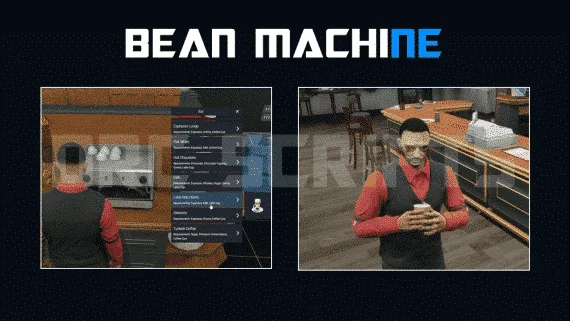
The job that puts new players in front of other players
Starter jobs are usually solitary: drive a truck, collect a thing, get paid. A coffee shop is the opposite, because the work is service, which means every shift is a conversation with a stranger. For a server trying to convert new arrivals into regulars, that property is worth more than the payout.
The work
Cooking with several preparation styles, order-taking through target interactions, and service at unique cash registers. 57 items with high-quality icons cover the menu. Every chair and table in the venue is usable, so customers can actually sit down, and the toilets work, which is exactly the sort of detail that makes a place feel real.
Delivery
A delivery system with 40 locations extends the job beyond the counter, which gives a quiet shift something to do and puts a courier on the roads.
Running a shift
Duty system, changing room and boss menu, in a NoPixel-style presentation. Server events are secured against cheating.
Map support
Preconfigured for the Gabz interior, with all coordinates changeable if you run a different MLO.
Inventory support
Broad by design: OX, Quasar, Cheeza, QB, LJ and AJ inventories are all supported, which is unusually wide and means it likely fits whatever you already run.
Dependencies
- Frameworks: ESX, QB.
- Target: qtarget, qb-target or ox_target.
- Boss menu: esx_society or qb-management.
- Skin menu: esx_skin, qb-clothing, fivem-appearance, ox_appearance or rcore_clothes.
- Input and context: ox_lib, or qb-input and qb-menu.
Under the hood
5,000+ lines, open source, configurable through the config file.
Delivered by email within minutes of checkout.
DRC Beanmachine Job installation for FiveM servers
DRC Beanmachine Job is a FiveM script from CFX Assets Tebex Store in the DRC Scripts category. After checkout, download the resource package from your CFX Assets Tebex Store order email, upload the included folder to your server, and start it from server.cfg.
resources/ directory.
ensure line using the exact folder name shipped in the download.
Use this as the server.cfg pattern. Replace the folder name if your downloaded resource folder is different:
ensure drc-beanmachine-jobThe previous generated tebex-... prefix has been removed here because the real folder name is controlled by the download package, not by this product page.
Why DRC Beanmachine Job fits a FiveM server
Framework labels for this listing: esx, qbcore, qbox. Check the included readme for any product-specific setup notes.
DRC Beanmachine Job compatibility and purchase details
Write a review
Reviews are moderated before appearing. Purchased the product? Your review gets a VERIFIED badge automatically.
Related scripts






About this FiveM script
DRC Beanmachine Job is a premium FiveM script for esx, qbcore, qbox servers. It’s part of the Tebex catalog, a curated selection of resources for QBCore, ESX and Qbox roleplay servers. Every script on Tebex ships with lifetime updates, instant email delivery, and email support for technical questions.
It installs as a standard FiveM resource: unzip it into your resources folder, add it to your server.cfg, and restart. The config-first design means you can change prices, permissions and locations without editing the core Lua.
Framework fit for this listing: esx, qbcore, qbox. Check the included readme for any setup notes specific to this resource. Licence and refund terms are set out in our terms.