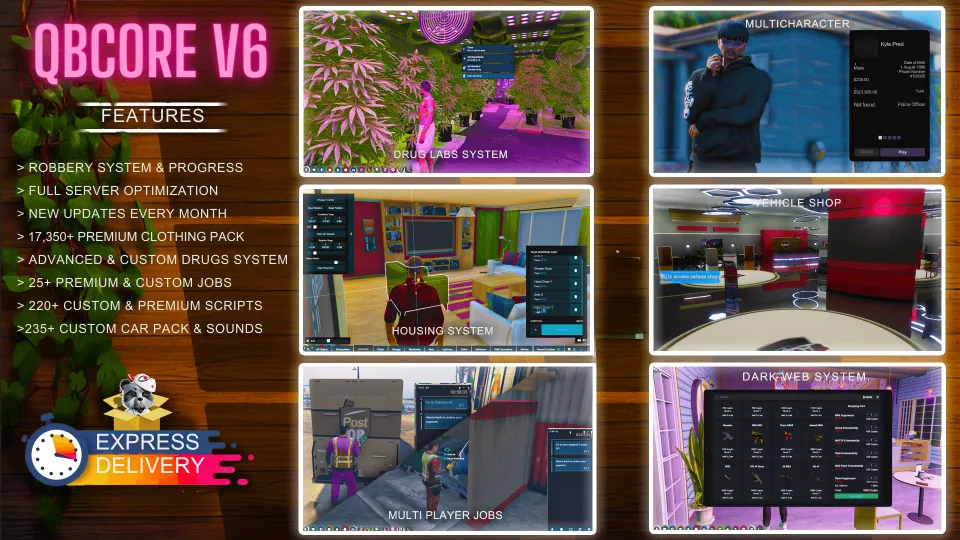
The build with an actual patch history
Most pre-made servers are a snapshot: whatever the assembler had installed the day they zipped it. V6 is the one in this line with a documented change log, and monthly updates, which is a materially different proposition, because it means someone is still adjusting balance after release rather than shipping and moving on.
The patch notes are worth reading before buying, because they tell you what kind of tuning the build receives. Recent entries cover police panic and GPS button cooldowns, weapon damage rebalancing, new housing props, an art robbery bug where a card was consumed when another player had already run the job, marked bill values in the blackmarket, art robbery payouts, and vehicle sale prices being synchronised across the core at 50% of value.
Content
- Robbery system with progression, rather than a flat set of independent jobs.
- Advanced custom drugs system.
- 25+ premium and custom jobs.
- 220+ custom and premium scripts.
- 235+ custom vehicles with their own sounds.
- 17,350+ item premium clothing pack.
Performance
The build has had a full server optimisation pass, which for a package of this size is the difference between it running and it merely existing.
Support and access
After purchase the scripts are delivered to your email, and access to the server files is permanent. Installation is straightforward enough to hire out, or the creator's support team will walk you through it via the Discord referenced in your order email.
What you supply
Hosting with real headroom, a database and your own Cfx.re key.
Delivered by email within minutes of checkout.
QBCore Framework V6 installation for FiveM servers
QBCore Framework V6 is a FiveM script from CFX Assets Tebex Store in the ESX Scripts category. After checkout, download the resource package from your CFX Assets Tebex Store order email, upload the included folder to your server, and start it from server.cfg.
resources/ directory.
ensure line using the exact folder name shipped in the download.
Use this as the server.cfg pattern. Replace the folder name if your downloaded resource folder is different:
ensure qbcore-framework-v6The previous generated tebex-... prefix has been removed here because the real folder name is controlled by the download package, not by this product page.
Why QBCore Framework V6 fits a FiveM server
Framework labels for this listing: esx, qbcore, qbox. Check the included readme for any product-specific setup notes.
QBCore Framework V6 compatibility and purchase details
Write a review
Reviews are moderated before appearing. Purchased the product? Your review gets a VERIFIED badge automatically.
Related scripts






About this FiveM script
QBCore Framework V6 is a premium FiveM script for esx, qbcore, qbox servers. It’s part of the Tebex catalog, a curated selection of resources for QBCore, ESX and Qbox roleplay servers. Every script on Tebex ships with lifetime updates, instant email delivery, and email support for technical questions.
It installs as a standard FiveM resource: unzip it into your resources folder, add it to your server.cfg, and restart. The config-first design means you can change prices, permissions and locations without editing the core Lua.
Framework fit for this listing: esx, qbcore, qbox. Check the included readme for any setup notes specific to this resource. Licence and refund terms are set out in our terms.