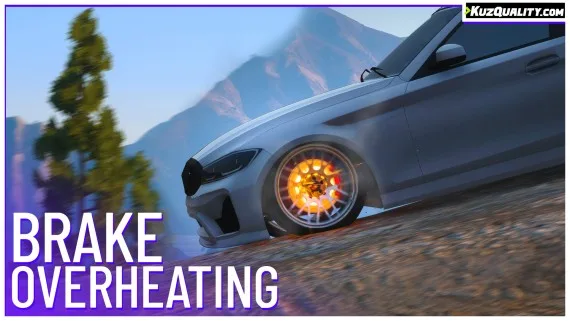


Giving the brake upgrade a reason to exist
On a stock server, brake upgrades are a number nobody notices. This script makes them matter by giving brakes a temperature: heavy acceleration and braking heats them, they glow as they get hot, and past a threshold they fade and stop working properly. Upgraded brakes heat more slowly and cool faster, which turns a cosmetic tuning option into a real purchase decision.
Where it changes the game
Pursuits, mostly. A long chase now has a cost that accumulates, so both sides have to think about pacing rather than holding the throttle down for ten minutes. Mountain descents become genuinely dangerous. And your mechanics get more work, which is the secondary effect worth having.
What is included
- A heat-up and cool-down model tuned for realism rather than an on/off state.
- Visible glow effects as temperature rises.
- Reduced braking performance when overheated.
- Works on all vehicles, including modded ones and bikes.
- Brake upgrades directly affect heat-up and cool-down times.
- Extensive configuration.
Performance
0.00ms idle, 0.01 to 0.02ms in a vehicle, 0.04 to 0.07ms with hot brakes, and 0.05 to 0.08ms near several vehicles with hot brakes.
Compatibility
Standalone with no framework required, and working on ESX, QBCore, Qbox, VRP or a server running no framework at all.
Delivered by email within minutes of checkout.
Brake Overheating installation for FiveM servers
Brake Overheating is a FiveM script from CFX Assets Tebex Store in the ESX Scripts category. After checkout, download the resource package from your CFX Assets Tebex Store order email, upload the included folder to your server, and start it from server.cfg.
resources/ directory.
ensure line using the exact folder name shipped in the download.
Use this as the server.cfg pattern. Replace the folder name if your downloaded resource folder is different:
ensure brake-overheatingThe previous generated tebex-... prefix has been removed here because the real folder name is controlled by the download package, not by this product page.
Why Brake Overheating fits a FiveM server
Framework labels for this listing: esx, qbcore, qbox. Check the included readme for any product-specific setup notes.
Brake Overheating compatibility and purchase details
Write a review
Reviews are moderated before appearing. Purchased the product? Your review gets a VERIFIED badge automatically.
Related scripts






About this FiveM script
Brake Overheating is a premium FiveM script for esx, qbcore, qbox servers. It’s part of the Tebex catalog, a curated selection of resources for QBCore, ESX and Qbox roleplay servers. Every script on Tebex ships with lifetime updates, instant email delivery, and email support for technical questions.
It installs as a standard FiveM resource: unzip it into your resources folder, add it to your server.cfg, and restart. The config-first design means you can change prices, permissions and locations without editing the core Lua.
Framework fit for this listing: esx, qbcore, qbox. Check the included readme for any setup notes specific to this resource. Licence and refund terms are set out in our terms.