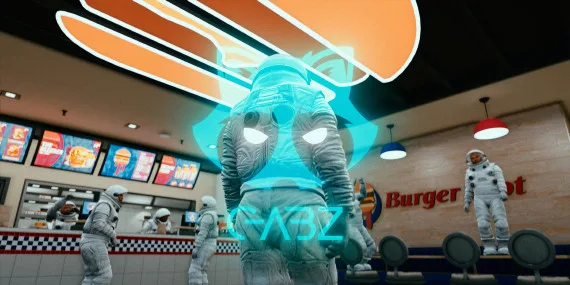
Ask ten new citizens where they got their first job and eight will say Burgershot. It's the default first rung of every RP economy, and Gabz gives the Vespucci store an interior that workload deserves — a fast-food restaurant detailed enough that a full shift of cooks, cashiers and one overwhelmed manager all have somewhere to stand.
Highlights
- Complete kitchen line with grills, fryers and prep stations
- Service counter with registers for till and order RP
- Dining floor with seating for the lunch-rush crowd
- Drive-thru window for car-side ordering scenes
- Staff and back-of-house areas for hiring, firing and payroll drama
Pair it with a Burgershot job script and a consumables system and you've got the busiest business in your city on day one. Just brace for the resmon question in your support channel — the answer is "it's fine."
Standalone, drag-and-drop map resource — works with QBox, QBCore and ESX, streams with optimised performance, and arrives as an instant digital download protected by Cfx.re escrow.
Gabz Burgershot MLO — FiveM Fast Food Restaurant Map installation for FiveM servers
Gabz Burgershot MLO — FiveM Fast Food Restaurant Map is a FiveM MLO map from Gabz in the FiveM MLOs category. After checkout, download the resource package from your CFX Assets Tebex Store order email, upload the included folder to your server, and start it from server.cfg.
resources/ directory.
ensure line using the exact folder name shipped in the download.
Use this as the server.cfg pattern. Replace the folder name if your downloaded resource folder is different:
ensure gabz-burgershot-mloThe previous generated tebex-... prefix has been removed here because the real folder name is controlled by the download package, not by this product page.
Why Gabz Burgershot MLO — FiveM Fast Food Restaurant Map fits a FiveM server
Gabz Burgershot MLO — FiveM Fast Food Restaurant Map compatibility and purchase details
Write a review
Reviews are moderated before appearing. Purchased the product? Your review gets a VERIFIED badge automatically.
Related scripts
About this FiveM script
Gabz Burgershot MLO — FiveM Fast Food Restaurant Map is a premium FiveM script. It’s part of the Tebex catalog, a curated selection of resources for QBCore, ESX and Qbox roleplay servers. Every script on Tebex ships with lifetime updates, instant email delivery, and email support for technical questions.
It installs as a standard FiveM resource: unzip it into your resources folder, add it to your server.cfg, and restart. The config-first design means you can change prices, permissions and locations without editing the core Lua.
Framework fit for this listing: standalone / framework-neutral. Check the included readme for any setup notes specific to this resource. Licence and refund terms are set out in our terms.